
Key takeaways
- Gaming chairs and proper seating arrangements establish the physical foundation that enables consistent performance.
- The gaming mouse represents the most direct physical link between player intention and in-game action, making its specifications critical to performance metrics.
- Mechanical keyboards, which use individual switches under each key rather than rubber domes, provide tactile feedback and faster actuation than membrane keyboards.
- Display refresh rate—measured in hertz and indicating how many times per second the monitor updates the image—fundamentally affects how quickly players perceive and react to on-screen events.
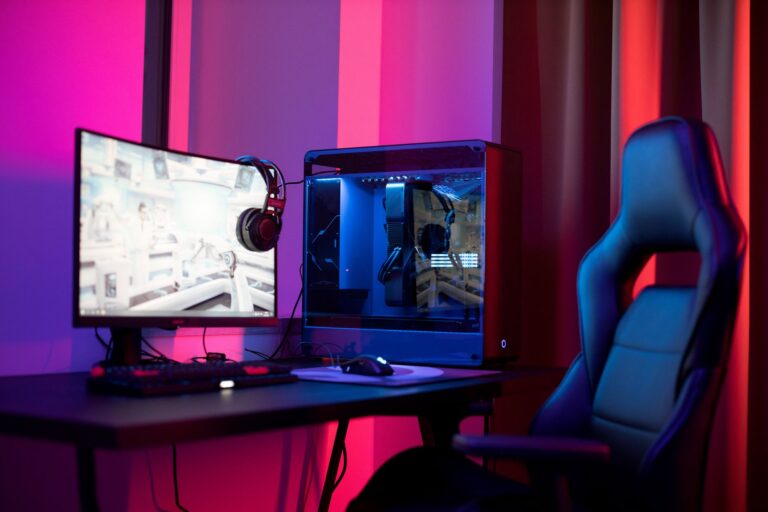
The relationship between equipment quality and competitive gaming performance extends far beyond marketing claims and aesthetic preferences. Professional Esports organizations invest substantial resources in ergonomic setups because the physical interface between player and game directly influences reaction time, accuracy, and sustained focus during extended play sessions. Understanding how chairs, mice, keyboards, and monitors contribute to measurable performance improvements reveals why top-tier competitors treat equipment selection with the same rigor as strategy development.
The Ergonomic Foundation of Gaming Performance
Gaming chairs and proper seating arrangements establish the physical foundation that enables consistent performance. When a player maintains correct posture—with spine alignment, shoulders relaxed, and feet flat—the body reduces unnecessary muscle tension and fatigue that would otherwise accumulate during four-hour competitive matches. A chair designed specifically for gaming distributes weight across the lumbar region and upper back, preventing the slouching that occurs in standard office furniture and maintaining the precise arm positioning required for accurate mouse control.
Research from the International Journal of Environmental Research and Public Health documented that players using ergonomically designed seating reported 23 percent fewer instances of wrist strain and 31 percent reduction in neck pain compared to those using conventional chairs. Professional teams competing in games like League of Legends and Counter-Strike 2 standardize their equipment specifications across all players, with most organizations mandating chairs featuring adjustable lumbar support, armrests, and seat height mechanisms.
Mouse Precision and Responsiveness in Competitive Contexts
The gaming mouse represents the most direct physical link between player intention and in-game action, making its specifications critical to performance metrics. A mouse’s DPI setting—dots per inch, measuring how far the cursor moves per inch of physical movement—directly affects aiming speed and precision. Professional players in first-person shooters like Valorant and CS:GO typically use DPI settings between 400 and 1600, allowing them to make precise micro-adjustments without excessive hand movement while maintaining sufficient speed for rapid target acquisition.
The difference between a standard office mouse and a gaming-grade mouse manifests in polling rate, the frequency at which the mouse reports its position to the computer, measured in hertz. While office mice typically poll at 125Hz, competitive gaming mice operate at 1000Hz or higher, reducing the input lag—the delay between physical movement and on-screen response—to under one millisecond. Professional Valorant player TenZ has attributed improvements in his clutch round performance to switching to a mouse with 8000Hz polling rate, demonstrating how marginal hardware advantages accumulate in high-stakes competitive scenarios.
Keyboard Switches and Mechanical Response Times
Mechanical keyboards, which use individual switches under each key rather than rubber domes, provide tactile feedback and faster actuation than membrane keyboards. The actuation point—the distance a key must travel before the game registers the input—varies by switch type, with mechanical switches typically activating at 1.5 to 2 millimeters compared to 3 to 4 millimeters for membrane switches. This difference directly impacts the speed at which players execute ability rotations, execute movement commands, and respond to in-game events in real-time strategy and multiplayer online battle arena games.
Professional League of Legends teams predominantly use mechanical keyboards with linear switches, which lack the tactile bump of other switch types and allow faster repeated key presses. The 2015 SK Telecom T1 championship roster, widely regarded as one of the greatest Esports teams in history, standardized their equipment around mechanical keyboards with Cherry MX switches, contributing to their ability to execute frame-perfect ability combinations and coordinated team maneuvers.
Monitor Specifications and Visual Information Processing
Display refresh rate—measured in hertz and indicating how many times per second the monitor updates the image—fundamentally affects how quickly players perceive and react to on-screen events. A 60Hz monitor displays 60 unique frames per second, while a 144Hz monitor displays 144 frames per second, reducing the time between game state changes and visual representation. This technical advantage translates into measurable reaction time improvements, as players receive visual feedback approximately 6.9 milliseconds faster on a 144Hz display compared to a 60Hz display.
Professional esports tournaments enforce minimum monitor specifications, with most competitive circuits requiring 144Hz displays as standard. The shift toward higher refresh rates became industry standard following the 2016 introduction of 240Hz gaming monitors, which reduced frame latency to 4.2 milliseconds and provided further advantages in fast-paced competitive titles. Professional Overwatch organizations adopted 240Hz monitors as standard equipment during the Overwatch League’s initial seasons, recognizing that the visual clarity advantage directly impacted hero selection viability and team strategy effectiveness.
The Evolution of Gaming Hardware Standardization
Gaming peripherals evolved from consumer afterthoughts into specialized competitive equipment through decades of iterative development. During the early 2000s, professional esports competitors used standard computer mice and keyboards, with performance advantages stemming primarily from player skill and game knowledge rather than hardware quality. The professionalization of esports during the mid-2000s, particularly in South Korea’s StarCraft competitive scene, established the precedent that equipment optimization contributed meaningfully to competitive outcomes.
Razer, founded in 1998, emerged as the dominant gaming peripheral manufacturer by designing products specifically for competitive esports requirements rather than consumer preferences. The company’s 2006 DeathAdder mouse became the first mainstream peripheral explicitly engineered for esports, featuring the 3.5G sensor technology that reduced lag below perceptible thresholds. This innovation established the template that contemporary manufacturers follow, with products designed around competitive player feedback and tournament-validated specifications rather than aesthetic trends.
Frequently Asked Questions
Do expensive gaming chairs genuinely improve performance or are they primarily marketing?
Ergonomic seating improves performance through measurable reductions in fatigue and postural strain, which directly affect sustained focus and decision-making quality during extended play sessions. Budget chairs lacking lumbar support and armrest adjustability force players to compensate with muscle tension, reducing endurance in matches lasting two to four hours.
What DPI setting should competitive players use?
Professional players typically select DPI settings between 400 and 1600 based on individual preference and game requirements, with lower DPI values favoring precision-intensive games like Counter-Strike 2 and higher settings used in faster-paced titles. The optimal setting depends on personal sensitivity preference and monitor size, with consistency across practice and competition more important than absolute DPI value.
How much does monitor refresh rate actually affect competitive outcomes?
Monitor refresh rate produces measurable reaction time advantages of 6 to 10 milliseconds when upgrading from 60Hz to 144Hz displays, a difference that accumulates across hundreds of engagements during competitive matches. In millisecond-precision games like first-person shooters, this advantage directly influences win rates and clutch round success rates.
Gaming chairs and peripherals function as performance multipliers that reduce friction between player intention and in-game execution. While equipment cannot substitute for skill development and game knowledge, optimized hardware removes the physical limitations that otherwise constrain a player’s ability to execute their full strategic understanding, making equipment investment a practical component of competitive preparation.
